I Built Peer-to-Peer File Sharing Web App - Here's How It Works
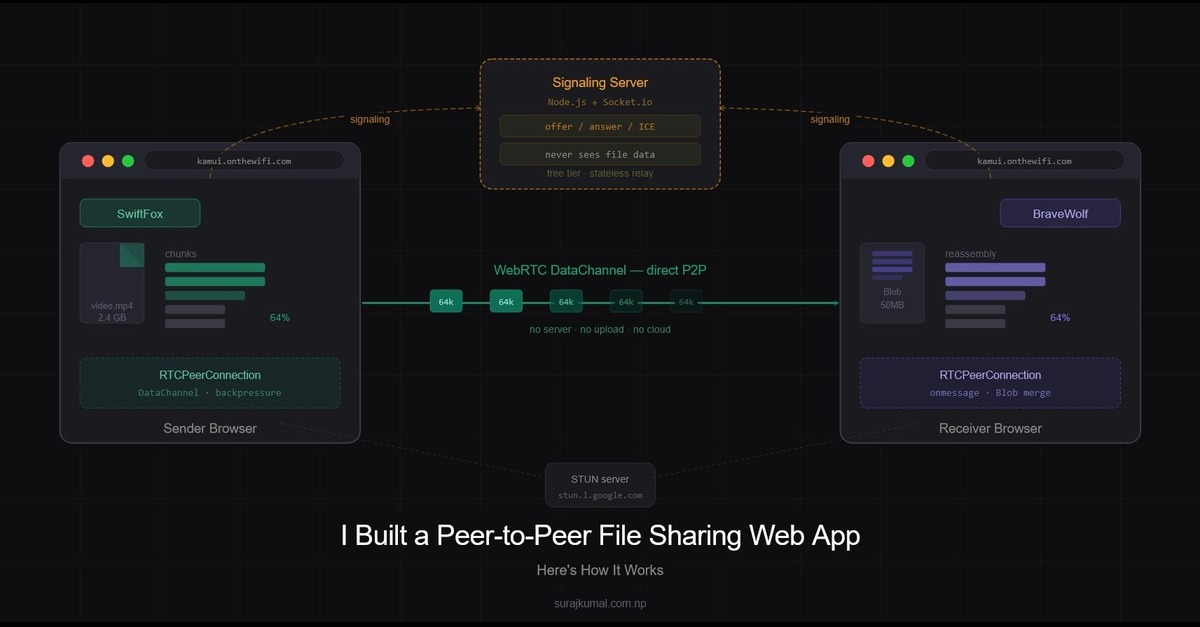
A peer-to-peer file sharing web app uses WebRTC to send files directly between browsers without any server storage. Here's how the architecture works in practice.
Most file sharing tools make you upload to a server, wait, then download on the other end. The file touches a server it never needed to touch. I wanted to build something different - files go directly from one device to another, through the browser, with no account and no installation required. That's kamui.
This post breaks down the full architecture: how the signaling layer works, how the WebRTC connection lifecycle is handled, the chunking strategy, and the tradeoffs I made to run the whole thing on free tier hosting.
Architecture Overview
Kamui has two parts:
A Node.js + Socket.io server — handles signaling only. It never sees your file data.
A client-side JavaScript app — handles everything else. Connection establishment, file chunking, transfer, reassembly, and download all happen in the browser.
This split was a deliberate decision. On free tier hosting, server resources are limited. Offloading all the heavy lifting to the client means the server stays lightweight and scales without cost. The server's only job is to help two browsers find each other — after that it gets out of the way.
The Signaling Layer — Node.js + Socket.io
WebRTC is peer-to-peer but it still needs a way to exchange connection metadata before the direct link is established. That's what the signaling server does.
const connectedPeers = new Map();

io.on("connection", (socket) => {
  socket.on("register", (data) => {
    const { deviceId, networkIP } = data;
    connectedPeers.set(deviceId, {
      socketId: socket.id,
      deviceId,
      networkIP,
    });
    io.emit("peer-list", Array.from(connectedPeers.values()));
  });

  socket.on("signal", (data) => {
    const { to, from, type } = data;
    const peer = connectedPeers.get(to);
    if (peer) {
      io.to(peer.socketId).emit("signal", {
        ...data,
        from: from,
      });
    }
  });

  socket.on("disconnect", () => {
    for (const [deviceId, peer] of connectedPeers.entries()) {
      if (peer.socketId === socket.id) {
        connectedPeers.delete(deviceId);
        break;
      }
    }
    io.emit("peer-list", Array.from(connectedPeers.values()));
  });
});
When a client connects it registers with two pieces of information — a device name and its public IP. The server stores this in a Map and broadcasts the updated peer list to everyone.
The signal relay is intentionally thin. It just looks up the target device by ID and forwards the message to their socket. It has no idea what's in the signal - it could be an offer, an answer, or an ICE candidate. That's not the server's concern.
Device Identity and LAN Filtering
Each device gets a randomly generated human-readable name when it loads the page.
generateDeviceName() {
  const adjectives = ["Quick", "Smart", "Cool", "Fast", "Bright", "Brave", "Swift"];
  const nouns = ["Fox", "Bear", "Lion", "Wolf", "Tiger", "Dragon", "Shark"];
  return `${adjectives[Math.floor(Math.random() * adjectives.length)]}${
    nouns[Math.floor(Math.random() * nouns.length)]
  }`;
}
Instead of showing every connected user on the planet, the client fetches its public IP from api.ipify.org and sends it during registration. On the client side the peer list is filtered to only show devices sharing the same public IP - meaning devices on the same network.
this.socket.on("peer-list", (peers) => {
  const sameLANPeers = peers.filter(
    (p) => p.networkIP === this.networkIP && p.deviceId !== this.deviceId,
  );
  this.updatePeerList(sameLANPeers);
});
This is simple and effective for the LAN use case. Two devices behind the same router share the same public IP. The filtering happens entirely on the client — the server broadcasts everything and the browser decides what to show.
WebRTC Connection Lifecycle
This is the most important design decision in Kamui: connections are ephemeral.
Most WebRTC implementations create a persistent connection and keep it open. Kamui creates a fresh connection at the moment a file is sent and closes it immediately after transfer completes. No connection is held open while idle.
The lifecycle is:
User selects a peer → selects a file → connection is created → file transfers → connection closes
selectPeer(peerId) {
  this.selectedPeer = peerId;
  // No connection here — just open file picker
  // Connection is created only when actually sending
  document.getElementById("fileInput").click();
}
When the user actually sends, a full WebRTC offer/answer exchange happens:
createSenderConnection(peerId) {
  return new Promise(async (resolve, reject) => {
    const pc = new RTCPeerConnection({
      iceServers: [
        { urls: "stun:stun.l.google.com:19302" },
        { urls: "stun:stun1.l.google.com:19302" },
      ],
    });

    const dataChannel = pc.createDataChannel("fileTransfer");

    const timeout = setTimeout(() => {
      pc.close();
      this.socket.off("signal", signalHandler);
      reject(new Error("Connection timed out"));
    }, 15000);

    dataChannel.onopen = () => {
      clearTimeout(timeout);
      resolve({ peerConnection: pc, dataChannel });
    };

    // Create and send offer to receiver
    const offer = await pc.createOffer();
    await pc.setLocalDescription(offer);

    this.socket.emit("signal", {
      type: "offer",
      offer,
      from: this.deviceId,
      to: peerId,
    });
  });
}
One issue with WebRTC signaling is that ICE candidates can arrive before the remote description is set. Without handling this the connection silently fails. Kamui queues candidates and flushes them once the remote description is ready:
const signalHandler = async (data) => {
  if (data.from !== peerId) return;

  if (data.type === "answer") {
    await pc.setRemoteDescription(new RTCSessionDescription(data.answer));
    remoteSet = true;

    // Flush candidates that arrived before the answer
    for (const c of iceCandidateQueue) {
      await pc.addIceCandidate(new RTCIceCandidate(c));
    }
    iceCandidateQueue.length = 0;
  } else if (data.type === "candidate") {
    if (remoteSet) {
      await pc.addIceCandidate(new RTCIceCandidate(data.candidate));
    } else {
      iceCandidateQueue.push(data.candidate);
    }
  }
};
After the transfer completes the connection is always closed - by design:
finally {
  setTimeout(() => {
    if (pc) pc.close();
    this.updateTransferStatus(peerId, "");
  }, 3000);
}
File Transfer — Chunking and Backpressure
You cannot send a large file over a WebRTC data channel in one shot. The data channel has a buffer and if you flood it faster than the receiver can process it, the connection drops.
Kamui uses two mechanisms to handle this cleanly.
1. Optimal Chunk Size
Chunk size is chosen based on file size. Smaller files use smaller chunks for lower overhead. Larger files use bigger chunks for throughput.
getOptimalChunkSize(fileSize) {
  const KB = 1024;
  const MB = KB * 1024;
  if (fileSize < 100 * KB) return 4 * KB;
  if (fileSize < 1 * MB) return 8 * KB;
  if (fileSize < 10 * MB) return 16 * KB;
  if (fileSize < 25 * MB) return 32 * KB;
  if (fileSize < 50 * MB) return 64 * KB;
  if (fileSize < 100 * MB) return 128 * KB;
  return 256 * KB; // hard cap — Safari and Firefox safe
}
The 256KB hard cap exists for browser compatibility. Safari and Firefox have stricter limits on how large a single data channel message can be. Going above 256KB causes silent failures in those browsers.
2. Backpressure with bufferedAmountLowThreshold
Instead of implementing manual acknowledgment per chunk, Kamui uses the browser's built-in backpressure mechanism:
dataChannel.bufferedAmountLowThreshold = 65536; // 64KB

const sendNextChunk = () => {
  if (offset >= file.size) {
    resolve();
    return;
  }

  // Pause if WebRTC buffer is filling up
  if (dataChannel.bufferedAmount > 256 * 1024) {
    dataChannel.onbufferedamountlow = () => {
      dataChannel.onbufferedamountlow = null;
      sendNextChunk();
    };
    return;
  }

  reader.readAsArrayBuffer(file.slice(offset, offset + chunkSize));
};
When the buffer exceeds 256KB the sender pauses and waits for the bufferedamountlow event before continuing. This lets the receiver drain without dropping data. No round-trip acknowledgment needed, no added latency - the browser handles it natively.
Large File Memory Optimization
For large files, accumulating thousands of small ArrayBuffer chunks in an array causes significant memory pressure on the receiver side. On some browsers this causes the tab to crash before the file finishes.
Kamui solves this with periodic consolidation on the receiver:
const CONSOLIDATE_THRESHOLD = 50 * 1024 * 1024; // 50MB
let bufferedSize = 0;

// Inside the binary chunk handler:
fileBuffer.push(data);
receivedSize += data.byteLength;
bufferedSize += data.byteLength;

if (bufferedSize >= CONSOLIDATE_THRESHOLD) {
  fileBuffer = [new Blob(fileBuffer)];
  bufferedSize = 0;
}
Every 50MB of received data the array of ArrayBuffers is collapsed into a single Blob. This keeps memory usage flat regardless of file size. The final download assembly works the same way — one new Blob(fileBuffer) at the end regardless of how many consolidations happened during transfer.
Batch Transfer
Kamui supports sending multiple files in a single connection. The sender wraps the transfer in batch signals:
dataChannel.send(
  JSON.stringify({ type: "batch-start", totalFiles: files.length })
);

for (let i = 0; i < files.length; i++) {
  await this.sendFile(dataChannel, files[i], i + 1, files.length, peerId);
}

dataChannel.send(JSON.stringify({ type: "batch-end" }));
The receiver tracks progress per file and triggers a download for each one as it completes. The connection stays open until all files are done then closes.
Free Tier Tradeoffs
Running Kamui on free tier hosting shaped most of these decisions.
The server does almost nothing by design. It has no file buffers, no binary processing, no per-connection state beyond a device ID and socket ID in a Map. Every connected peer costs the server nothing after registration.
The real resource consumption — chunking, buffering, reassembly, memory management - happens entirely in the user's browser. Two devices transferring a 2GB file between them use zero server bandwidth for that transfer. The server only saw the initial handshake.
This architecture also means the server has no single point of failure for transfers in progress. If the server restarts mid-transfer the file transfer fails but that's a WebRTC connection issue, not a data loss issue - no file was ever on the server.
The tradeoff is that the connection quality depends entirely on the two clients. On a fast local network this is unnoticeable. On a congested network the browser's backpressure handling does its job but the transfer will be slower than a centralized upload/download approach.
500+ Visitors, Zero Marketing
Kamui reached 500+ visitors with a single LinkedIn post published over a year ago. No paid promotion, no repeated posting, no SEO campaign at launch.
That's organic traffic finding a tool that solves a real problem - sharing files across devices on the same network without uploading anything to the cloud. The architecture that makes it work is the same thing that makes it worth using.
The server stays lightweight. The files stay private. The transfer is direct.
That was the goal from the start.
Kamui is live at [https://kamui.onthewifi.com]. Built with Node.js, Socket.io, and WebRTC. You can explore full source code on Github: [https://github.com/suraj-kumal/kamui]
Do you like the post?
You can mail me at [email protected]
I post blogs—feel free to send feedback, suggestions, or just connect.
print('read_more_blogs')
print('back_to_portfolio')